Embeddings
Note
Embeddings are used to compare two texts and see how similar they are. This is the base of semantic search.
An embedding is a vector representation of a text that captures the meaning of the text. It is a float array of 1536 elements for OpenAI for the small model.
To manipulate embeddings we use the Document class that contains the text and some metadata useful for the vector store.
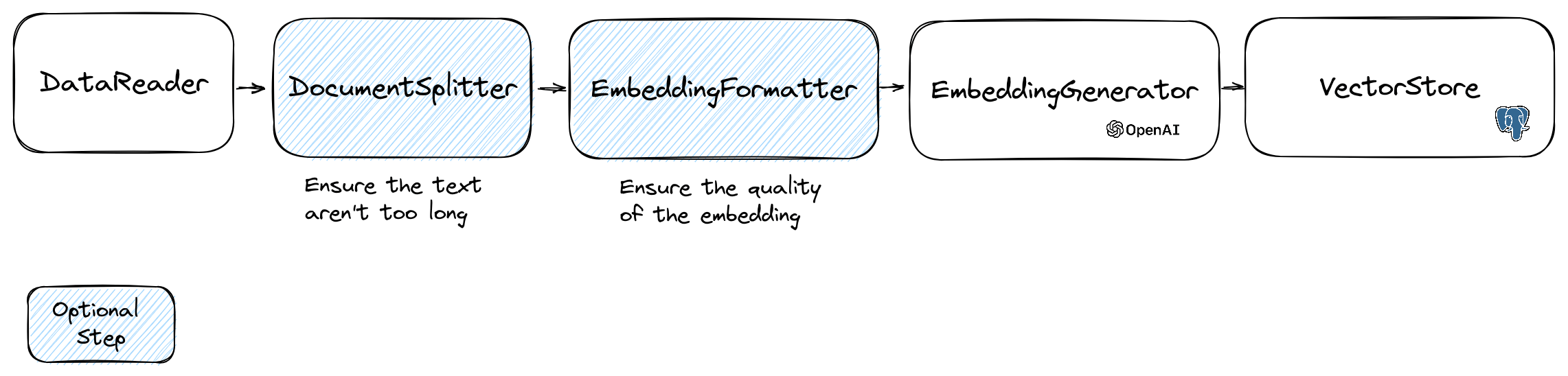
The creation of an embedding follow the following flow:
Read data
The first part of the flow is to read data from a source. This can be a database, a csv file, a json file, a text file, a website, a pdf, a word document, an excel file, … The only requirement is that you can read the data and that you can extract the text from it.
For now we only support text files, pdf and docx but we plan to support other data type in the future.
You can use the FileDataReader class to read a file. It takes a path to a file or a directory as parameter.
The second optional parameter is the class name of the entity that will be used to store the embedding.
The class needs to extend the Document class
and even the DoctrineEmbeddingEntityBase class (that extends the Document class) if you want to use the Doctrine vector store.
Here is an example of using a sample PlaceEntity class as document type:
$filePath = __DIR__.'/PlacesTextFiles';
$reader = new FileDataReader($filePath, PlaceEntity::class);
$documents = $reader->getDocuments();
If it’s OK for you to use the default Document class, you can go this way:
$filePath = __DIR__.'/PlacesTextFiles';
$reader = new FileDataReader($filePath);
$documents = $reader->getDocuments();
To create your own data reader you need to create a class that implements the DataReader interface.
Document Splitter
The embeddings models have a limit of string size that they can process.
To avoid this problem we split the document into smaller chunks.
The DocumentSplitter class is used to split the document into smaller chunks.
$splitDocuments = DocumentSplitter::splitDocuments($documents, 800);
Embedding Formatter
The EmbeddingFormatter is an optional step to format each chunk of text into a format with the most context.
Adding a header and links to other documents can help the LLM to understand the context of the text.
$formattedDocuments = EmbeddingFormatter::formatEmbeddings($splitDocuments);
Embedding Generator
This is the step where we generate the embedding for each chunk of text by calling the LLM.
21 february 2024 : Adding VoyageAI embeddings
You need to have a VoyageAI account to use this API. More information on the VoyageAI website.
And you need to set up the VOYAGE_AI_API_KEY environment variable or pass it to the constructor of the Voyage3LargeEmbeddingGenerator class.
This is an example how to use it, just for the vector transformation:
$embeddingGenerator = new Voyage3LargeEmbeddingGenerator();

$embeddedDocuments = $embeddingGenerator->embedDocuments($documents);
For RAG optimization, you should be using the forRetrieval() and forStorage() methods:
$embeddingGenerator = new Voyage3LargeEmbeddingGenerator();

// Embed the documents for vector database storage
$vectorsForDb = $embeddingGenerator->forStorage()->embedDocuments($documents);

// Insert the vectors into the database...
// ...

// When you want to perform a similarity search, you should use the `forRetrieval()` method:
$similarDocuments = $embeddingGenerator->forRetrieval()->embedText('What is the capital of France?');
Currently, some chains do not support the methods for storage and retrieval!
30 january 2024 : Adding Mistral embedding API
You need to have a Mistral account to use this API. More information on the Mistral website.
And you need to set up the MISTRAL_API_KEY environment variable or pass it to the constructor of the MistralEmbeddingGenerator class.
25 january 2024 : New embedding models and API updates OpenAI has 2 new models that can be used to generate embeddings. More information on the OpenAI Blog.
Status |
Model |
Embedding size |
|---|---|---|
Default |
text-embedding-ada-002 |
1536 |
New |
text-embedding-3-small |
1536 |
New |
text-embedding-3-large |
3072 |
You can embed the documents using the following code:
$embeddingGenerator = new OpenAI3SmallEmbeddingGenerator();
$embeddedDocuments = $embeddingGenerator->embedDocuments($formattedDocuments);
You can also create a embedding from a text using the following code:
$embeddingGenerator = new OpenAI3SmallEmbeddingGenerator();
$embedding = $embeddingGenerator->embedText('I love food');
//You can then use the embedding to perform a similarity search
There is the OllamaEmbeddingGenerator as well, which has an embedding size of 1024.
VectorStores
Once you have embeddings you need to store them in a vector store. The vector store is a database that can store vectors and perform a similarity search. There are currently these vectorStore classes:
MemoryVectorStore stores the embeddings in the memory
FileSystemVectorStore stores the embeddings in a file
DoctrineVectorStore stores the embeddings in a postgresql or in a MariaDB database. (require doctrine/orm)
QdrantVectorStore stores the embeddings in a Qdrant vectorStore. (require hkulekci/qdrant)
RedisVectorStore stores the embeddings in a Redis database. (require predis/predis)
ElasticsearchVectorStore stores the embeddings in a Elasticsearch database. (require elasticsearch/elasticsearch)
MilvusVectorStore stores the embeddings in a Milvus database.
ChromaDBVectorStore stores the embeddings in a ChromaDB database.
AstraDBVectorStore stores the embeddings in a AstraDBB database.
OpenSearchVectorStore stores the embeddings in a OpenSearch database, which is a fork of Elasticsearch.
TypesenseVectorStore stores the embeddings in a Typesense database.
MongoDBVectorStore stores the embeddings in MongoDB Atlas. (require mongodb/mongodb and ext-mongodb)
Example of usage with the DoctrineVectorStore class to store the embeddings in a database:
$vectorStore = new DoctrineVectorStore($entityManager, PlaceEntity::class);
$vectorStore->addDocuments($embeddedDocuments);
Once you have done that you can perform a similarity search over your data. You need to pass the embedding of the text you want to search and the number of results you want to get.
$embedding = $embeddingGenerator->embedText('France the country');
/** @var PlaceEntity[] $result */
$result = $vectorStore->similaritySearch($embedding, 2);
To get full example you can have a look at Doctrine integration tests files.
VectorStores vs DocumentStores
As we have seen, a VectorStore is an engine that can be used to perform similarity searches on documents.
A DocumentStore is an abstraction around a storage for documents that can be queried with more classical methods.
In many cases vector stores can be also document stores and vice versa, but this is not mandatory.
There are currently these DocumentStore classes:
MemoryVectorStore
FileSystemVectorStore
DoctrineVectorStore
MilvusVectorStore
Those implementations are both vector stores and document stores.
Let’s see the current implementations of vector stores in LLPhant.
Doctrine VectorStore
One simple solution for web developers is to use a postgresql database as a vectorStore with the pgvector extension. You can find all the information on the pgvector extension on its github repository.
We suggest you 3 simple solutions to get a postgresql database with the extension enabled:
use docker with the docker-compose-pgvector.yml file
use Supabase
use Neon
In any case you will need to activate the extension:
CREATE EXTENSION IF NOT EXISTS vector;
Then you can create a table and store vectors. This sql query will create the table corresponding to PlaceEntity in the test folder.
CREATE TABLE IF NOT EXISTS test_place (
   id SERIAL PRIMARY KEY,
   content TEXT,
   type TEXT,
   sourcetype TEXT,
   sourcename TEXT,
   embedding VECTOR
);
Warning
If the embedding length is not 1536 you will need to specify it in the entity by overriding the $embedding property.
Typically, if you use the OpenAI3LargeEmbeddingGenerator class, you will need to set the length to 3072 in the entity.
Or if you use the MistralEmbeddingGenerator class, you will need to set the length to 1024 in the entity.
The PlaceEntity
#[Entity]
#[Table(name: 'test_place')]
class PlaceEntity extends DoctrineEmbeddingEntityBase
{
#[ORM\Column(type: Types::STRING, nullable: true)]
public ?string $type;

#[ORM\Column(type: VectorType::VECTOR, length: 3072)]
public ?array $embedding;
}
The same DoctrineVectorStore now supports also MariaDB, starting from version 11.7-rc.
Here you can find the queries needed to initialize the DB.
Redis VectorStore
Prerequisites :
Redis server running (see Redis quickstart)
Predis composer package installed (see Predis)
Then create a new Redis Client with your server credentials, and pass it to the RedisVectorStore constructor :
use Predis\Client;

$redisClient = new Client([
    'scheme' => 'tcp',
    'host' => 'localhost',
    'port' => 6379,
]);
$vectorStore = new RedisVectorStore($redisClient, 'llphant_custom_index'); // The default index is llphant
You can now use the RedisVectorStore as any other VectorStore.
Elasticsearch VectorStore
Prerequisites :
Elasticsearch server running (see Elasticsearch quickstart)
Elasticsearch PHP client installed (see Elasticsearch PHP client)
Then create a new Elasticsearch Client with your server credentials, and pass it to the ElasticsearchVectorStore constructor :
use Elastic\Elasticsearch\ClientBuilder;

$client = (new ClientBuilder())::create()
    ->setHosts(['http://localhost:9200'])
    ->build();
$vectorStore = new ElasticsearchVectorStore($client, 'llphant_custom_index'); // The default index is llphant
You can now use the ElasticsearchVectorStore as any other VectorStore.
Milvus VectorStore
Prerequisites : Milvus server running (see Milvus docs)
Then create a new Milvus client (LLPhant\Embeddings\VectorStores\Milvus\MiluvsClient) with your server credentials,
and pass it to the MilvusVectorStore constructor :
$client = new MilvusClient('localhost', '19530', 'root', 'milvus');
$vectorStore = new MilvusVectorStore($client);
You can now use the MilvusVectorStore as any other VectorStore.
ChromaDB VectorStore
Prerequisites : Chroma server running (see Chroma docs). You can run it locally using this docker compose file.
Then create a new ChromaDB vector store (LLPhant\Embeddings\VectorStores\ChromaDB\ChromaDBVectorStore), for example:
$vectorStore = new ChromaDBVectorStore(host: 'my_host', authToken: 'my_optional_auth_token');
You can now use this vector store as any other VectorStore.
AstraDB VectorStore
Prerequisites : an AstraDB account where you can create and delete databases (see AstraDB docs).
At the moment you can not run this DB it locally. You have to set ASTRADB_ENDPOINT and ASTRADB_TOKEN environment variables with data needed to connect to your instance.
Then create a new AstraDB vector store (LLPhant\Embeddings\VectorStores\AstraDB\AstraDBVectorStore), for example:
$vectorStore = new AstraDBVectorStore(new AstraDBClient(collectionName: 'my_collection')));

// You can use any embedding generator, but the embedding length must match what is defined for your collection
$embeddingGenerator = new OpenAI3SmallEmbeddingGenerator();

$currentEmbeddingLength = $vectorStore->getEmbeddingLength();
if ($currentEmbeddingLength === 0) {
    $vectorStore->createCollection($embeddingGenerator->getEmbeddingLength());
} elseif ($embeddingGenerator->getEmbeddingLength() !== $currentEmbeddingLength) {
    $vectorStore->deleteCollection();
    $vectorStore->createCollection($embeddingGenerator->getEmbeddingLength());
}
You can now use this vector store as any other VectorStore.
Typesense VectorStore
Prerequisites : Typesense server running (see Typesense). You can run it locally using this docker compose file.
Then create a new TypesenseDB vector store (LLPhant\Embeddings\VectorStores\TypeSense\TypesenseVectorStore), for example:
// Default connection properties come from env vars TYPESENSE_API_KEY and TYPESENSE_NODE
$vectorStore = new TypesenseVectorStore('test_collection');
MongoDB VectorStore
Prerequisites : a MongoDB Atlas cluster (see MongoDB Atlas docs).
You can run it locally using this docker compose file.
If you want to set up authentication for your local cluster, set the MONGODB_USERNAME and MONGODB_PASSWORD environment variables.
Wait for the service’s status to be “Healthy” before using it.
Then create a new MongoDB vector store (LLPhant\Embeddings\VectorStores\MongoDB\MongoDBVectorStore), for example:
$client = new Client(uri: 'your-connection-string');
$vectorStore = new MongoDBVectorStore($client, database: 'your-database-name');
FileSystem VectorStore
Please note that this vector store is intended just for small tests. In a production environment you should consider to use a more effective engine. In a recent version (0.8.13) we modified the format of the vector store files. To use those files you have to convert them to the new format: convertFromOldFileFormat:
$vectorStore = new FileSystemVectorStore('/paht/to/new_format_vector_store.txt');
$vectorStore->convertFromOldFileFormat('/path/to/old_format_vector_store.json')
This is documentation for LLPhant.